




Hybrid events are a convenient new way to bridge in-person and online events. In the past, organizers who wanted to provide members with both physical and virtual attendance options had to create two separate Meetup events or had to add a Zoom link to the description of an event.
Now, Meetup Pro organizers can remove the hassle by combining those attendance options into one streamlined event, where attendees simply choose how they want to engage when they register. Follow this guide to learn the basics of hosting a hybrid event, and discover how this new tool can greatly expand the horizons of your growing community.
Hybrid events are a convenient new way to bridge in-person and online events. In the past, organizers who wanted to provide members with both physical and virtual attendance options had to create two separate Meetup events or had to add a Zoom link to the description of an event.
Now, Meetup Pro organizers can remove the hassle by combining those attendance options into one streamlined event, where attendees simply choose how they want to engage when they register. Follow this guide to learn the basics of hosting a hybrid event, and discover how this new tool can greatly expand the horizons of your growing community.
How hybrid events work
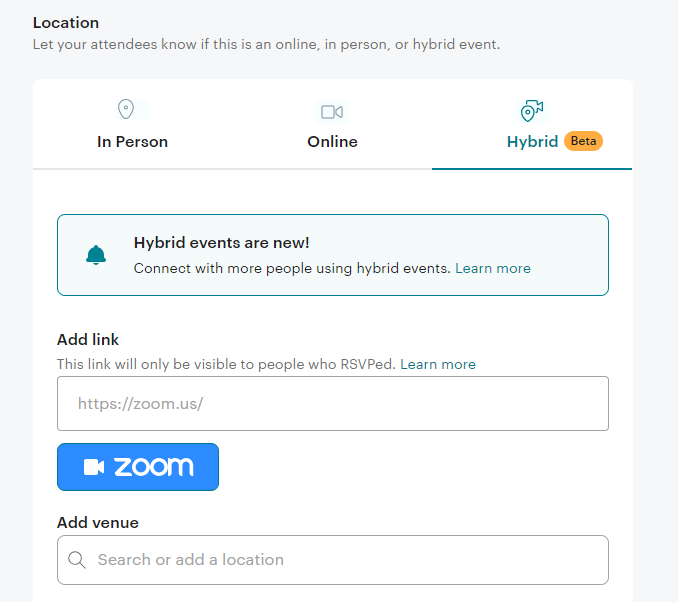
Whenever you create an event on Meetup, you are prompted to enter information into the Location field, starting with the choice between the “In Person” and “Online” tabs. Now, you’ll see a third “Hybrid” tab in the Location field, with its own unique icon.
Under the “Hybrid” tab, you can enter the physical location of your event, and also provide a link to attend the event online through a video conferencing service like Zoom. In fact, with Meetup’s special Zoom integration, you can create your virtual event link directly within the “Hybrid” tab.
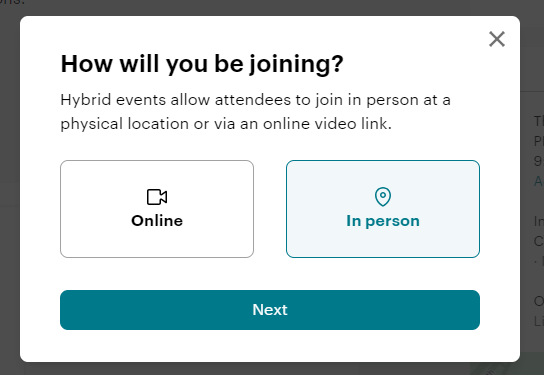
Later, when members come across your hybrid event and are interested in attending, they will automatically be asked to select how they plan to join.
How hybrid events benefit organizers
The days of duplicating events are over! With the new hybrid feature, you can cut down on administrative tasks and avoid situations where members are confused about where to RSVP.
Another helpful tool that hybrid events provide is the ability to set different capacity limits for each attendance option. For example, the venue you use as the physical location may have a limit to the number of people who can attend. But online, you can engage with hundreds, perhaps even thousands of attendees.
Similarly, you might have different costs associated with people attending in-person or online. The flexible fee feature allows you to customize your ticketing by venue type, so you can charge separate fees depending on how a member attends.
Hybrid events mean flexibility for Meetup organizers and members alike. Hybrid events extend the reach of an event to a global audience and make an event more accessible for people with disabilities or other obstacles to attending in person. Online components to an event allow for a host of digital tools from event chat options to closed captioning that would be much harder to facilitate for an event that is only in person.
Overall, when creating a hybrid event on Meetup, you’ll be sure your community members are clearly informed about the different ways they can participate.
How hybrid events benefit members
The ability to attend the same event either IRL or online gives Meetup members so much more flexibility in how they approach everything from socializing and hobbying to fitness and career development.
With this new advantage, your backup plan is settled. For example, imagine you plan to attend a yoga session at the park, but a scheduling issue comes up. Instead of missing out and feeling frustrated, you could still reap the rewards of mind and body by joining the class online, from anywhere!
And with the confidence of this reliable backup plan in mind, there’s more leeway to be adventurous in RSVPing for future events. Members who sign up for hybrid events will know that the virtual option has them covered, should something like illness, transportation problems, or any other of life’s twists and turns arise.
Plus, there’s no guesswork involved. When browsing Meetup, members will be able to see at a glance which events offer this helpful accommodation.
The current beta version and the future of hybrid events
A beta version simply means that Meetup is beginning to roll out the new feature to organizers, and collecting feedback for improvements. While this beta version includes all the capabilities described above, the experience of Meetup Pro organizers during the beta launch will help the tech team develop even more sophisticated tools for flexible event planning. In fact, there are already plans to update the hybrid events feature with enhanced options like:
- The ability to view attendees by venue type in the Meetup for Organizers app and web platform
- The ability to create hybrid events in the Meetup for Organizers app
If you want to take full advantage of event-hosting powers on the cutting edge, start a free 30-day trial of Meetup Pro today.

Last modified on October 24, 2023